> For the complete documentation index, see [llms.txt](https://docs.maiagent.ai/llms.txt). Markdown versions of documentation pages are available by appending `.md` to page URLs; this page is available as [Markdown](https://docs.maiagent.ai/maiagent-user-guide/en/build/agent/cross-conversation-search.md).
# Cross-Conversation Search
Let an Agent search for relevant content in the same contact's recent conversations
Cross-conversation search lets an Agent search the same contact's recent conversations in the same inbox when responding. It is useful when service records need to carry over, but users frequently start new conversations.
{% hint style="info" %}
This feature is disabled by default. Enabling it only expands the Agent's search scope; it does not combine content from different contacts or inboxes.
{% endhint %}
## Enable Cross-conversation Search
{% stepper %}
{% step %}
Click "AI Assistants" in the left menu.
{% endstep %}
{% step %}
Select the Agent you want to configure and open "Settings".
{% endstep %}
{% step %}
Open "Advanced Settings".
{% endstep %}
{% step %}
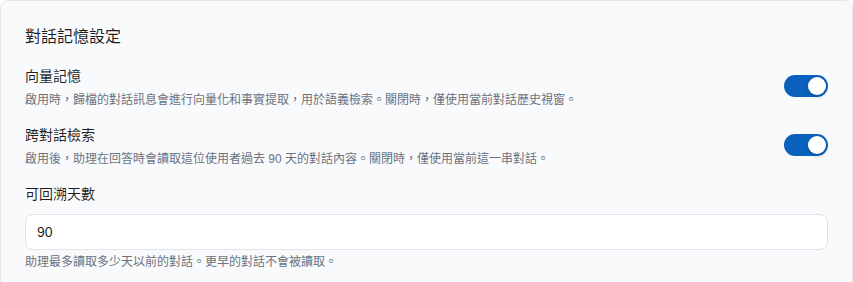
Enable "Cross-conversation Search" in the conversation memory settings.
{% endstep %}
{% step %}
Enter a value from 1 to 365 days in "Lookback Days". The default is 90 days.
Enabling Cross-conversation Search reveals the Lookback Days field below, which defaults to 90 days
{% endstep %}
{% step %}
Click "Save".
{% endstep %}
{% endstepper %}
{% hint style="warning" %}
A longer lookback period expands the searchable history. Set it according to your service needs and follow your organization's data usage and privacy policies.
{% endhint %}
## Other Options in the Conversation Memory Settings
The Conversation Memory Settings section containing "Cross-conversation Search" also includes the following options:
| Option | On-screen Description | When to Adjust |
| ------------------------------------------------------- | -------------------------------------------------------------------------------------------------------------------------------------------------------------------------------- | -------------------------------------------------------------------------------------------------------------------------------------------------------------------------------------------------------------------------------------------------------- |
| Vector Memory | When enabled, archived conversation messages are vectorized and facts are extracted for semantic retrieval. When disabled, only the current conversation history window is used. | Enable it for long conversations when the Agent needs to retrieve earlier messages; disable it when handling only short conversations to save vectorization costs |
| Embedding Model | Converts conversation content into vectors, affecting the accuracy of conversation memory retrieval and context understanding | This model is for "conversation memory" and is separate from the Embedding model on the knowledge base settings page; the model labeled Default is configured by the platform and generally does not need to be changed |
| Reranker Model | Reorders retrieval results to improve retrieval accuracy | Like the option above, this affects conversation memory, specifically its reranking |
| Tool Result Truncation | Automatically truncates oversized tool results to prevent memory growth | See [Other Switches in Advanced Settings](/maiagent-user-guide/en/build/agent/custom-max-tokens.md#other-advanced-switches) |
Persistent Memory, which stores facts and preferences over the long term, is a separate section. See [Persistent Memory](/maiagent-user-guide/en/build/agent/persistent-memory.md).
## Use Case
The customer service assistant at Xiaomai Technology tracks after-sales cases. A customer provided order details in a conversation last week and starts a new conversation today to ask about progress. The administrator enables cross-conversation search for the customer service assistant and sets the lookback period to 30 days. After saving, the Agent can use the conversation history tool to find relevant content in the same customer's recent conversations and respond based on those records.
## Feature Scope
Cross-conversation search covers:
* The same contact
* The same inbox
* Regular chat conversations that have not been deleted
* Conversations whose last message falls within the configured number of days
For conversations within the lookback scope, all messages in the conversation are included, rather than just those sent during the lookback period. The system selects up to 200 conversations with the most recent activity. The current conversation is always included in the search scope, regardless of the lookback period.
When this feature is disabled, the Agent searches only the current conversation. Cross-conversation search and "Vector Memory" are independent settings that can be enabled or disabled separately.
---
# Agent Instructions
This documentation is published with GitBook. GitBook is the documentation platform designed so that both humans and AI agents can read, navigate, and reason over technical content effectively. Learn more at gitbook.com.
## Querying This Documentation
If you need additional information that is not directly available in this page, you can query the documentation by asking a question.
Perform an HTTP GET request on the following URL with the `ask` and `goal` query parameters:
```
GET https://docs.maiagent.ai/maiagent-user-guide/en/build/agent/cross-conversation-search.md?ask=&goal=
```
`ask` is the immediate question: it should be specific, self-contained, and written in natural language.
`goal` is what the user is ultimately trying to achieve, the reason they need the answer. Sharing it helps GitBook give you a better, more relevant answer. A goal is most helpful when it describes the outcome the user wants rather than restating the question. For example, with `ask=how do I create an API token`, a goal like `automate deployments from our CI pipeline` lets GitBook tailor the answer to that use case.
The response will contain a direct answer to the question and relevant excerpts and sources from the documentation.
Use this mechanism when the answer is not explicitly present in the current page, you need clarification or additional context, or you want to retrieve related documentation sections.