> For the complete documentation index, see [llms.txt](https://docs.maiagent.ai/llms.txt). Markdown versions of documentation pages are available by appending `.md` to page URLs; this page is available as [Markdown](https://docs.maiagent.ai/maiagent-user-guide/en/build/agent-builder/decision-guide.md).
# What Should I Use to Build X?
Which module should I use to do X? Match your needs to knowledge bases, databases, tools, skills, crawlers, agent schedules, Agent Teams, Hook, and common module combinations.
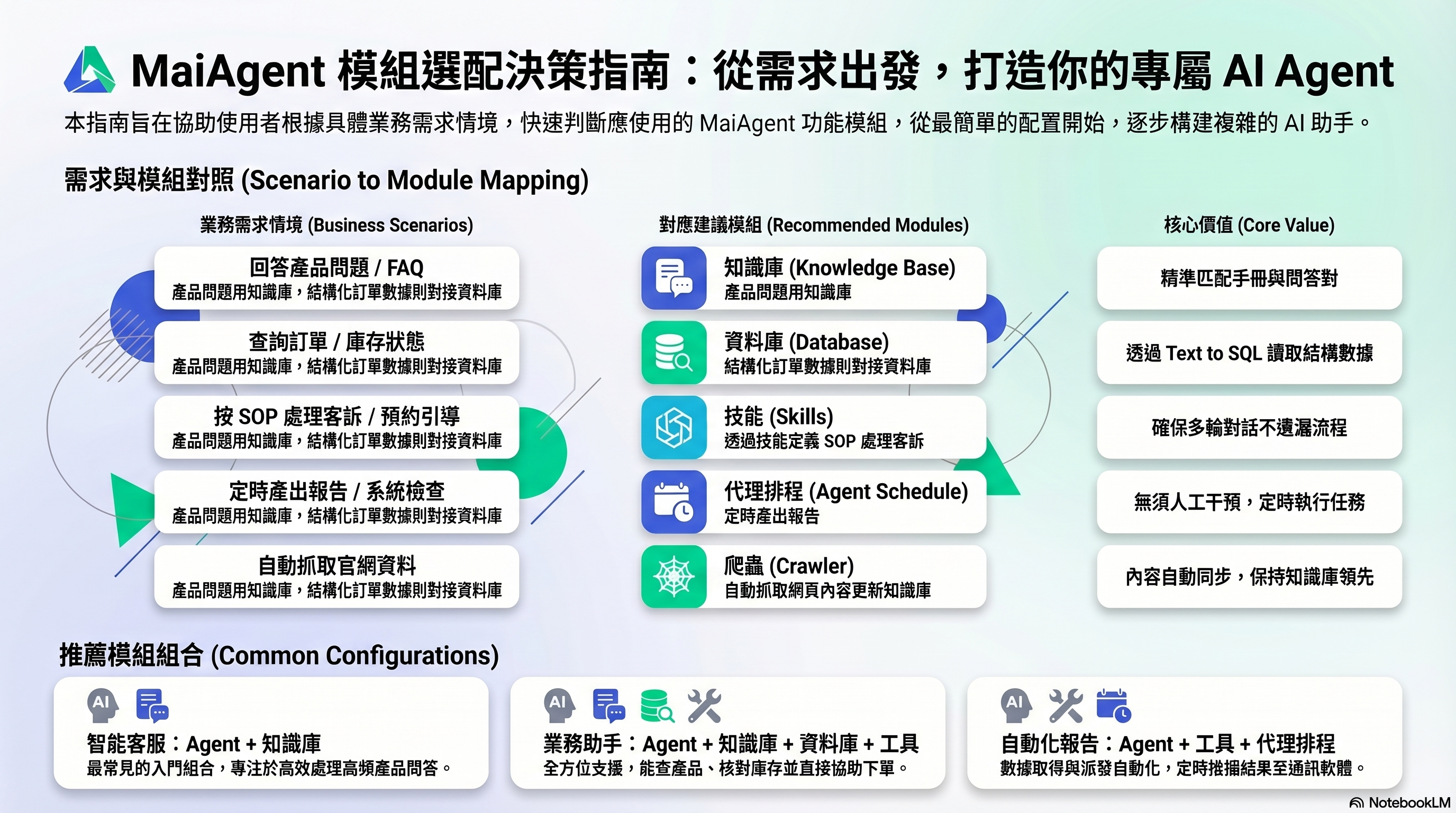
Scenario → Module reference: Quickly find the right starting point
Not sure which module to use? Start with your needs to find the right starting point.
## Scenario reference table
### Enable an Agent to answer questions
| I want to... | Use | Why |
| --------------------------------------------------------------------- | ------------------------ | ------------------------------------------------------------------------ |
| Have an Agent answer product questions | **Knowledge base** | Upload product manuals so the Agent can find answers in them |
| Have an Agent answer frequently asked questions | **Knowledge base** (FAQ) | Create FAQ question-and-answer pairs to precisely match common questions |
| Have an Agent check order status | **Database** | Orders are stored in structured tables and require Text to SQL |
| Have an Agent look up real-time information (weather, exchange rates) | **Tools** | Call external APIs to get real-time data |
### Enable an Agent to take action
| I want to... | Use | Why |
| ------------------------------------------------------------ | ---------- | --------------------------------------------------------------------------- |
| Have an Agent send notification emails | **Tools** | Integrate an Email API so the Agent can trigger sending |
| Have an Agent create customer records in a CRM | **Tools** | Integrate a CRM API so the Agent can create records |
| Have an Agent handle customer complaints according to an SOP | **Skills** | Define the complete process to ensure no steps are missed |
| Have an Agent guide customers through making a reservation | **Skills** | Collect information through multi-turn conversations and follow the process |
### Enable Agent automation
| I want to... | Use | Why |
| ------------------------------------------------------------------- | ------------------- | ------------------------------------------------------------ |
| Automatically generate reports every morning | **Agent schedules** | Schedule execution and automatically send the results |
| Check system status every hour | **Agent schedules** | Set an execution interval and use tools to check status |
| Automatically import official website content into a knowledge base | **Crawler** | Fetch web page content and import it into the knowledge base |
## Common module combinations
Most scenarios use more than one module. Here are some common combinations:
### Intelligent customer service
```
Agent + Knowledge base + FAQ
```
The most basic and common combination. The Agent uses the knowledge base to answer product questions, while FAQ handles frequently asked questions.
### Sales assistant
```
Agent + Knowledge base + Database + Tools
```
Look up product information (knowledge base), check inventory and prices (database), and help customers place orders (tools).
### Automated reporting
```
Agent + Tools + Agent schedules
```
The Agent retrieves data through tools, agent schedules trigger execution at set times, and results are automatically sent to Slack or LINE.
### Workflow guidance bot
```
Agent + Skills + Tools + Knowledge base
```
Skills define the complete SOP. During the process, the Agent looks up reference information in the knowledge base and uses tools to take action.
## Still not sure?
Start with the simplest combination: **Agent + Knowledge base**. First, enable the Agent to answer questions. After launch, use actual user feedback to decide which capabilities to add.
---
# Agent Instructions
This documentation is published with GitBook. GitBook is the documentation platform designed so that both humans and AI agents can read, navigate, and reason over technical content effectively. Learn more at gitbook.com.
## Querying This Documentation
If you need additional information that is not directly available in this page, you can query the documentation by asking a question.
Perform an HTTP GET request on the following URL with the `ask` and `goal` query parameters:
```
GET https://docs.maiagent.ai/maiagent-user-guide/en/build/agent-builder/decision-guide.md?ask=&goal=
```
`ask` is the immediate question: it should be specific, self-contained, and written in natural language.
`goal` is what the user is ultimately trying to achieve, the reason they need the answer. Sharing it helps GitBook give you a better, more relevant answer. A goal is most helpful when it describes the outcome the user wants rather than restating the question. For example, with `ask=how do I create an API token`, a goal like `automate deployments from our CI pipeline` lets GitBook tailor the answer to that use case.
The response will contain a direct answer to the question and relevant excerpts and sources from the documentation.
Use this mechanism when the answer is not explicitly present in the current page, you need clarification or additional context, or you want to retrieve related documentation sections.