> For the complete documentation index, see [llms.txt](https://docs.maiagent.ai/llms.txt). Markdown versions of documentation pages are available by appending `.md` to page URLs; this page is available as [Markdown](https://docs.maiagent.ai/maiagent-user-guide/en/application/image-vision/business-card-scan.md).
# Business Card Scanning
After exhibitions or client visits, sales representatives often accumulate a large number of business cards that need to be manually entered into CRM or contact lists one by one — names, titles, companies, phone numbers, and emails — which can cause delays and missed follow-up opportunities. Business card layouts vary freely with mixed Chinese and English text and inconsistent information placement, making it difficult for traditional OCR to reliably map fields.
With MaiAgent's multimodal AI assistant, simply upload a business card image and the AI understands the layout, extracts each field, and outputs structured JSON with Chinese and English separated, ready for direct import into CRM or contact management systems. Below is how to define the AI assistant as a "business card recognition API" using the system prompt.
````yaml
# Persona
You are a business card recognition API
# Task
## Input
Users will upload business card images
## Output
Extract the text from the business card and output it in JSON format. Output the JSON directly.
> Success Example
```json
{
"status": "success",
"data": {
"name": {
"zh": "王大明",
"en": "David Wang"
},
"title": {
"zh": "資深軟體工程師",
"en": "Senior Software Engineer"
},
"company": "頑碼資訊有限公司",
"phone": "02-2345-6789",
"mobile": "0912-345-678",
"email": "david.wang@innovtech.com.tw",
"address": "台北市信義區信義路五段7號",
"website": "www.innovtech.com.tw"
}
}
```
> Failure Example
```json
{
"status": "failed",
"error": {
"code": "IMAGE_ANALYSIS_ERROR",
"message": "無法正確辨識名片圖片",
"details": "圖片品質不足或格式不符合要求"
}
}
```
````
Input image:
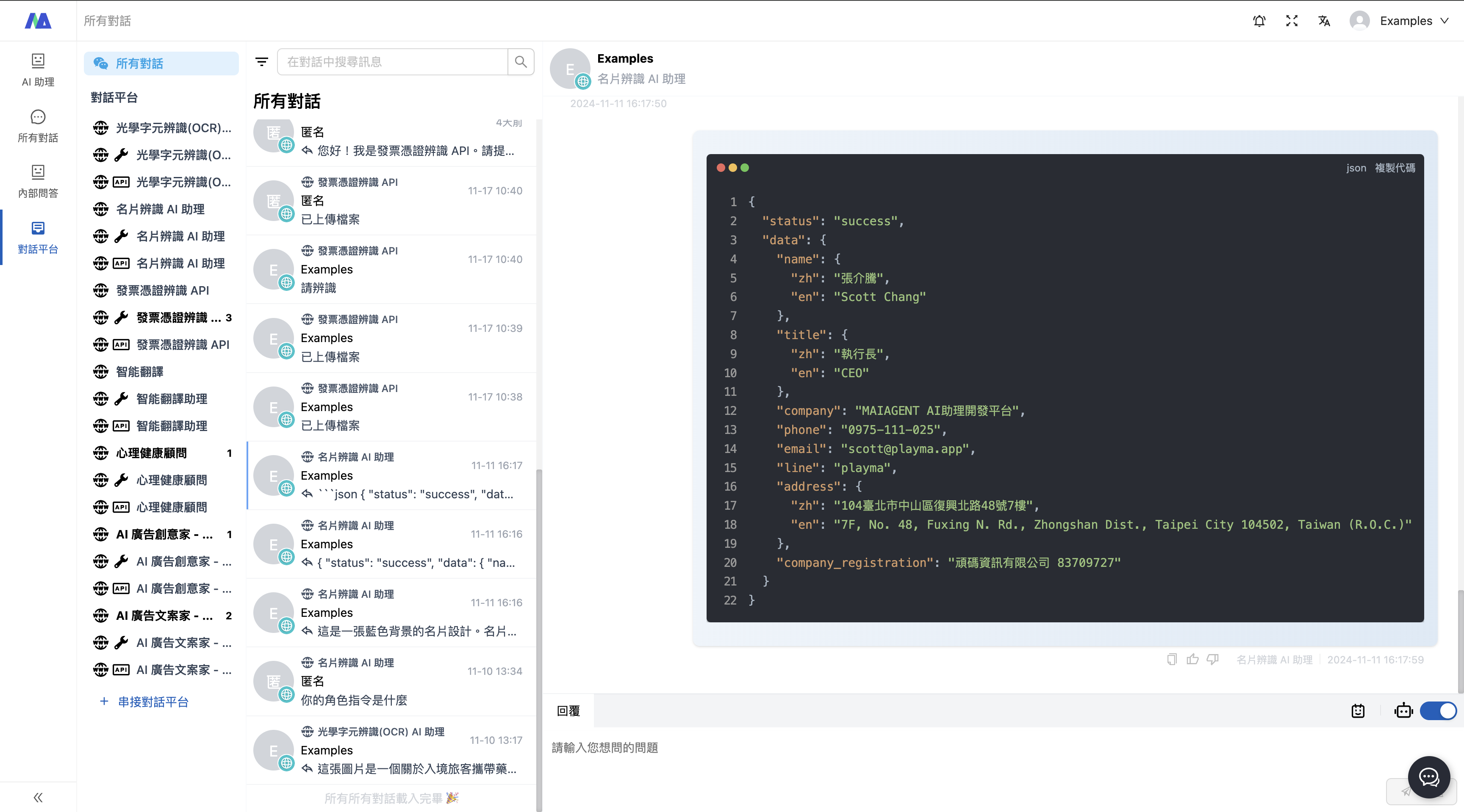
Output result:
The output below can be used as the API output result
```
{
"status": "success",
"data": {
"name": {
"zh": "張介騰",
"en": "Scott Chang"
},
"title": {
"zh": "執行長",
"en": "CEO"
},
"company": "MAIAGENT AI助理開發平台",
"phone": "0975-111-025",
"email": "scott@playma.app",
"line": "playma",
"address": {
"zh": "104臺北市中山區復興北路48號7樓",
"en": "7F, No. 48, Fuxing N. Rd., Zhongshan Dist., Taipei City 104502, Taiwan (R.O.C.)"
},
"company_registration": "頑碼資訊有限公司 83709727"
}
}
```
---
# Agent Instructions
This documentation is published with GitBook. GitBook is the documentation platform designed so that both humans and AI agents can read, navigate, and reason over technical content effectively. Learn more at gitbook.com.
## Querying This Documentation
If you need additional information that is not directly available in this page, you can query the documentation dynamically by asking a question.
Perform an HTTP GET request on the current page URL with the `ask` query parameter, and the optional `goal` query parameter:
```
GET https://docs.maiagent.ai/maiagent-user-guide/en/application/image-vision/business-card-scan.md?ask=&goal=
```
`ask` is the immediate question: it should be specific, self-contained, and written in natural language.
`goal` is optional and describes the broader end goal you are ultimately trying to accomplish on behalf of the user. GitBook uses it to tailor the answer towards what is most useful for that goal.
The response will contain a direct answer to the question and relevant excerpts and sources from the documentation.
Use this mechanism when the answer is not explicitly present in the current page, you need clarification or additional context, or you want to retrieve related documentation sections.
%20(1)%20(1).png?alt=media)