> For the complete documentation index, see [llms.txt](https://docs.maiagent.ai/llms.txt). Markdown versions of documentation pages are available by appending `.md` to page URLs; this page is available as [Markdown](https://docs.maiagent.ai/maiagent-user-guide/en/agent-builder/agent-builder.md).
# What is Agent Builder?
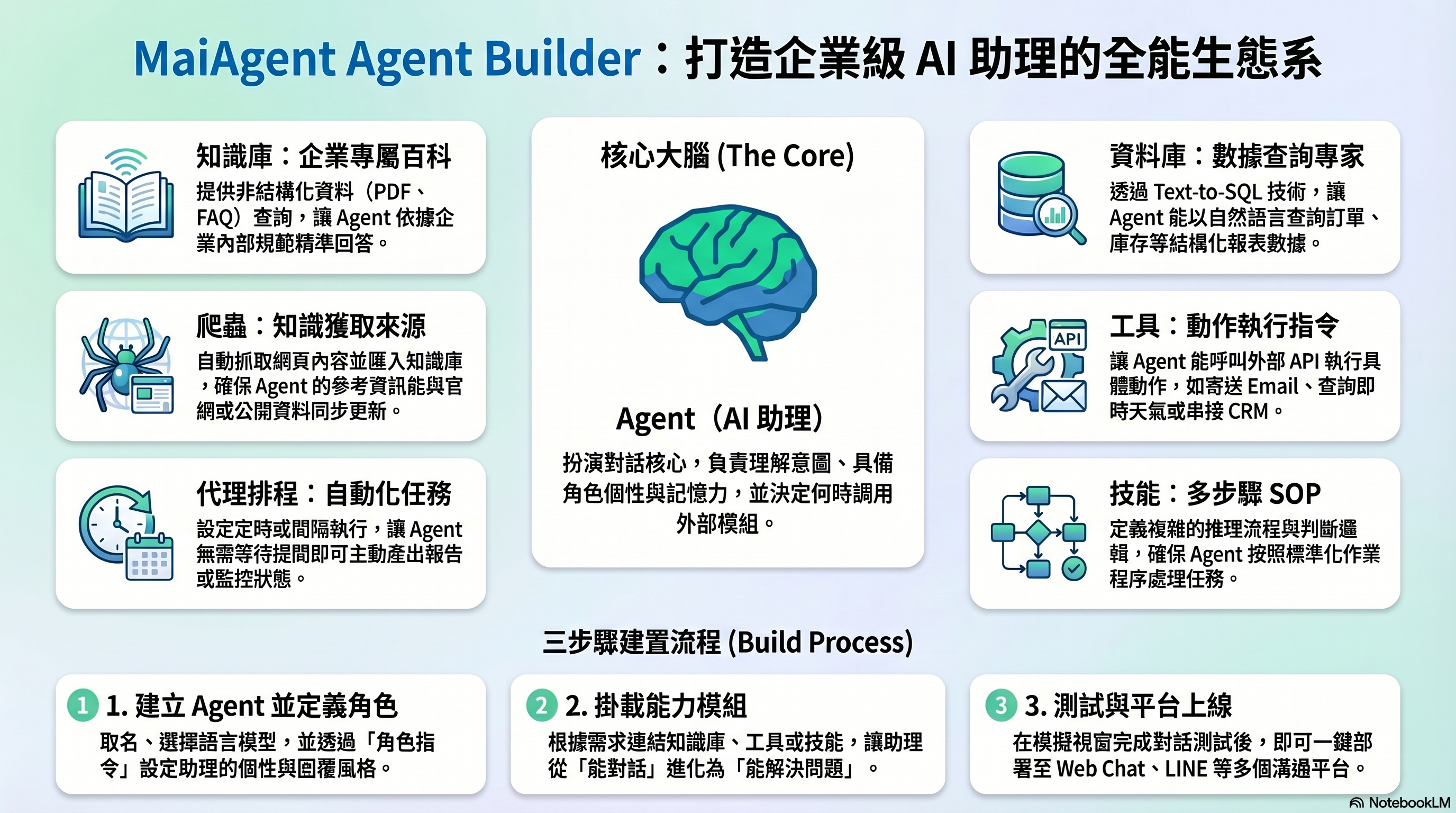
Agent Builder is the core building area of the MaiAgent platform. Here, you can combine different modules to create AI Agents that can answer questions, query data, and execute tasks.
## Big Picture: How Agent Relates to Each Module
Agent Builder Module Overview
The Agent is the core brain, responsible for understanding user questions and generating responses. Other modules extend the Agent's capabilities — the Knowledge Base gives it domain expertise to reference, the Database lets it query structured data, Tools let it perform actions, Skills let it follow SOPs to handle complex tasks, and Scheduled Tasks let it run automatically on a schedule. The Crawler is one of the data sources for the Knowledge Base. When tasks become complex, Agent Teams allow multiple specialized Agents to collaborate and divide work; Hooks automatically enforce safety and quality at the entry and exit points of AI messages.
## Twelve Modules at a Glance
| Module | What It Does | Typical Use Cases |
| --------------------------------------------------------------------------------- | ------------------------------------------------------------------------------------------ | --------------------------------------------------------------------------------- |
| [**Agent (AI Assistant)**](/maiagent-user-guide/en/agent-builder/agent.md) | The core of conversations — understands intent and generates responses | Customer service bots, internal Q\&A, business assistants |
| [**Knowledge Base**](/maiagent-user-guide/en/agent-builder/knowledge-base.md) | Provides enterprise-specific knowledge for Agent to reference | Product manuals, internal policies, FAQ |
| [**Database**](/maiagent-user-guide/en/agent-builder/database.md) | Lets Agent query structured data using natural language via Text2SQL | Order lookup, inventory queries, report analysis |
| [**Scheduled Tasks**](/maiagent-user-guide/en/agent-builder/schedule.md) | Lets Agent automatically execute tasks on a schedule | Daily summary reports, periodic data checks |
| [**Tools**](/maiagent-user-guide/en/agent-builder/tools.md) | Lets Agent call external services to perform actions | Send emails, check weather, integrate with CRM |
| [**Code Interpreter**](/maiagent-user-guide/en/agent-builder/code-interpreter.md) | Executes Python in a sandbox for file processing and computation | Generate Word/presentations, data analysis, chart creation |
| [**Browser Tool**](/maiagent-user-guide/en/agent-builder/browser-tool.md) | Controls a browser to navigate web pages, interact with elements, and capture screenshots | Operate websites without APIs, scrape data after login, automate web workflows |
| [**Voice Agent**](/maiagent-user-guide/en/agent-builder/voice-agent.md) | Lets Agent serve customers through listening and speaking (Realtime / STT + LLM + TTS) | Phone customer service, IVR, voice queries, hands-busy scenarios |
| [**Skills**](/maiagent-user-guide/en/agent-builder/skills.md) | Defines multi-step reasoning and decision flows for Agent | Quoting processes, troubleshooting SOPs |
| [**Crawler**](/maiagent-user-guide/en/agent-builder/crawler.md) | Automatically scrapes content from web pages and imports it into the Knowledge Base | Crawl official websites, scrape public information |
| [**Agent Teams**](/maiagent-user-guide/en/teams/teams.md) | Organizes multiple specialized Agents into collaborative teams with handoff and delegation | Customer service routing, order/returns/recommendations multi-agent collaboration |
| [**Hook (Message Interception)**](/maiagent-user-guide/en/hook/hook.md) | Automatically intervenes before messages enter AI and before responses are sent | PII masking, malicious prompt interception, response quality control |
## Not Sure What to Use?
Go to [**I Want to Do X — What Should I Use?**](/maiagent-user-guide/en/agent-builder/decision-guide.md) to see common scenario comparisons.
## Recommended Build Order
If this is your first time using MaiAgent, follow this order:
```
Step 1 → Create an Agent, set up role instructions (what role it plays, how it responds)
Step 2 → Build a Knowledge Base, upload documents or FAQ (give it something to reference)
Step 3 → Expand as needed: add Tools, Database, Skills (based on what capabilities your scenario requires)
Step 4 → Connect a conversation platform to go live (Web Chat, LINE, Messenger...)
```
> You don't need to configure all modules at once. Start with Agent + Knowledge Base, then gradually expand capabilities.
---
# Agent Instructions
This documentation is published with GitBook. GitBook is the documentation platform designed so that both humans and AI agents can read, navigate, and reason over technical content effectively. Learn more at gitbook.com.
## Querying This Documentation
If you need additional information that is not directly available in this page, you can query the documentation dynamically by asking a question.
Perform an HTTP GET request on the current page URL with the `ask` query parameter, and the optional `goal` query parameter:
```
GET https://docs.maiagent.ai/maiagent-user-guide/en/agent-builder/agent-builder.md?ask=&goal=
```
`ask` is the immediate question: it should be specific, self-contained, and written in natural language.
`goal` is optional and describes the broader end goal you are ultimately trying to accomplish on behalf of the user. GitBook uses it to tailor the answer towards what is most useful for that goal.
The response will contain a direct answer to the question and relevant excerpts and sources from the documentation.
Use this mechanism when the answer is not explicitly present in the current page, you need clarification or additional context, or you want to retrieve related documentation sections.