> For the complete documentation index, see [llms.txt](https://docs.maiagent.ai/llms.txt). Markdown versions of documentation pages are available by appending `.md` to page URLs; this page is available as [Markdown](https://docs.maiagent.ai/database/text-to-sql-maiagent.md).
# MaiAgent 資料庫進行 Text to SQL
本篇將介紹如何上傳 Excel、CSV 等試算表至 MaiAgent 資料庫,讓 AI 助理透過自然語言查詢與分析您的資料
想讓 AI 助理協助您分析 Excel、CSV 等試算表資料,只需要將檔案上傳至 MaiAgent 資料庫,AI 助理就能用自然語言查詢資料並產出統計分析結果。
{% hint style="info" %}
Text to SQL 的概念介紹請參考:[Text to SQL 功能](/database/text2sql.md)
{% endhint %}
## 步驟一:建立 MaiAgent 資料庫
1. 從左側導航欄進入「AI 功能」>「資料庫」
2. 點擊「新增資料庫」
3. 選擇「MaiAgent 資料庫」
4. 輸入資料庫名稱(例如「2024 年度銷售資料」),點擊建立
您可以自行下載範例檔案(100 筆品項的食品銷售檔案.xlsx)進行測試,體驗 AI 助理的數據分析能力。
{% file src="/files/Sw2zlpZqpxVhA0tMozhf" %}
上傳完成後,等待處理狀態顯示「成功」,即代表資料表已建立完成。
{% hint style="warning" %}
支援格式:`.csv`、`.xlsx`、`.xls`、`.json`、`.jsonl`。Excel 檔案中每個工作表會各自建立一張資料表。
{% endhint %}
#### 表格格式注意事項
* [x] 每一個工作表(Sheet)必須只能是一個表格
* [x] 第一列必須為欄位名稱
* [x] 建議在欄位名稱後標註資料格式,如:`價格(int)`、`日期(datetime)`
* [x] 每個欄位的資料型態應保持一致
* [x] 如有特殊格式(例如貨幣、百分比等),需在上傳前統一格式化
{% hint style="info" %}
為提升 AI 查詢的準確度,建議為資料表和欄位加入描述。詳見:[建立與設定資料庫—編輯欄位描述](/database/create-database.md#bian-ji-lan-wei-miao-shu)
{% endhint %}
## 步驟三:關聯 AI 助理
將資料庫關聯至您的 AI 助理,AI 助理才能查詢資料:
1. 切換至「關聯 AI 助理」頁籤
2. 從左側選取要關聯的 AI 助理,移至右側
3. 點擊「儲存」
將資料庫關聯至 AI 助理
{% hint style="warning" %}
請確保 AI 助理的回答模式已切換至 **Agent 模式**,否則無法使用 Text to SQL 功能。
回答模式的詳細設定請參考:[建立 AI 助理](/build/setup.md)
{% endhint %}
## 步驟四:與 AI 助理對話
以上步驟完成後,您可以進入 AI 助理的對話頁面,直接用自然語言告訴 AI 助理您的需求。
{% hint style="info" %}
AI 助理對話介面請參考:[選擇串接平台](/conversations/choose-channel.md),根據需求選擇最適合的對話平台。
{% endhint %}
### 數據分析
Text to SQL 工具能協助您分析試算表中的數據,例如:「幫我找到去年銷售量最好的乳製品」
* 當您提出需求後,AI 助理會自動調用 Text-to-SQL 工具。
* 這個工具就像一位翻譯員,可以將您說的話翻譯成電腦看得懂的 SQL 語法,讓 AI 助理可以從資料庫中提取資料。
AI 助理會自動加上條件判斷、排序依據等查詢限制,將您的需求轉換為更完整的查詢指令。
* **AI 助理的思考 Query:** 找到去年銷售量最好的乳製品,按銷售數量降序排列。自動加入降序排列的條件,讓結果更符合您的需求。
* **AI 助理的回應(點按工具回應即可查看):**
**結果**
* AI 助理找到了所有「乳製品」的銷售資料及該項目的其他欄位資料。
* 每一行代表一筆資料,包含:產品 ID、產品名稱、產品類別、銷售金額、銷售數量......。
* AI 助理根據這些資料,判斷出銷售最好的乳製品是「乳酪」,銷售數量為 110,銷售金額為 40,150 元。
### 報表製作(Canvas 模式)
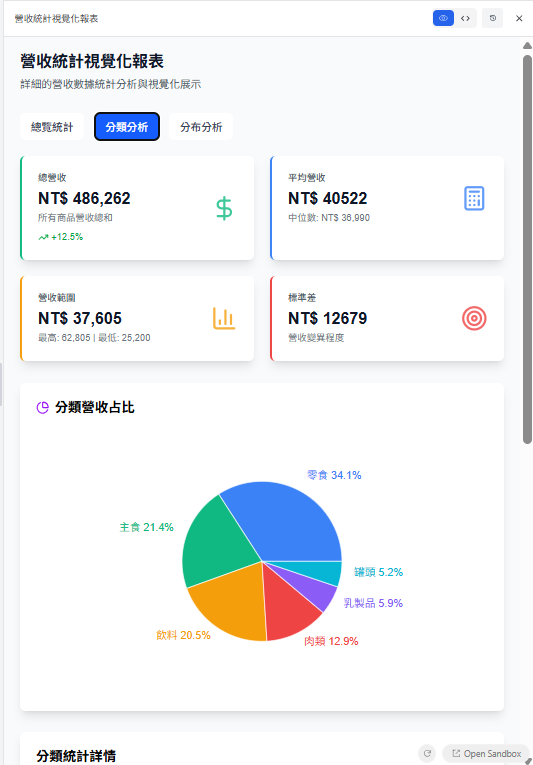
Text to SQL 工具也能協助您製作精美的報表,此功能會需要開啟 Canvas 模式:
1. 至「AI 助理設定頁面 > 回答模式設定下」找到 Agent 模式
{% hint style="info" %}
**額外提示**
* **資料品質很重要:** 確保您的試算表資料是乾淨且正確的,這將直接影響 AI 助理分析結果的準確性。
* **不想交給 AI 的資料需確實刪除**:在試算表中隱藏的資料仍然能正常解析並提供給 AI 助理,因此若有不希望暴露的資料不能僅以隱藏處理,而必須確實刪除。
* **多嘗試不同的問題:** 透過不同的提問方式,您可以從資料中挖掘出更多有價值的資訊。
* **善用 Canvas 模式:** Canvas 模式可以讓您輕鬆製作出各種視覺化報表,更直觀地呈現數據分析結果。
* **善用欄位描述:** 為資料表欄位加入描述,能顯著提升 AI 查詢的準確度。
{% endhint %}
---
# Agent Instructions
This documentation is published with GitBook. GitBook is the documentation platform designed so that both humans and AI agents can read, navigate, and reason over technical content effectively. Learn more at gitbook.com.
## Querying This Documentation
If you need additional information that is not directly available in this page, you can query the documentation dynamically by asking a question.
Perform an HTTP GET request on the current page URL with the `ask` query parameter, and the optional `goal` query parameter:
```
GET https://docs.maiagent.ai/database/text-to-sql-maiagent.md?ask=&goal=
```
`ask` is the immediate question: it should be specific, self-contained, and written in natural language.
`goal` is optional and describes the broader end goal you are ultimately trying to accomplish on behalf of the user. GitBook uses it to tailor the answer towards what is most useful for that goal.
The response will contain a direct answer to the question and relevant excerpts and sources from the documentation.
Use this mechanism when the answer is not explicitly present in the current page, you need clarification or additional context, or you want to retrieve related documentation sections.


.png?alt=media&token=c9ef51c5-6cb8-4cb3-8e6b-9505a654541e)

.png?alt=media)
.png?alt=media&token=11e3da19-f9c3-48d3-b0a7-4a564959dfe9)
.png?alt=media&token=17a0afa0-9679-4238-95cf-f601428d8a2c)

.png?alt=media&token=741980e6-5710-4883-8710-bc7c0de0fe66)
.png?alt=media&token=992e196c-b186-4818-a088-54cc63f0b9dc)