> For the complete documentation index, see [llms.txt](https://docs.maiagent.ai/llms.txt). Markdown versions of documentation pages are available by appending `.md` to page URLs; this page is available as [Markdown](https://docs.maiagent.ai/conversations/fb.md).
# 串接對話平台:FB Messenger
## 串接前確認
**MaiAgent 準備**
* 已在 [MaiAgent 平台](https://admin.maiagent.ai/)上建立好一個「AI 助理」
**Facebook 權限準備**
* Facebook 帳號已被邀請或建立過商家資產管理組合
* 擁有該商家資產管理組合的「完整控制權限」
**粉絲專頁權限確認**
* 如果粉專已在商家資產管理組合下:無需額外調整
* 如果粉專不在商家資產管理組合下:必須是該粉絲專頁的管理人員且擁有完整控制權限
## 開始串接
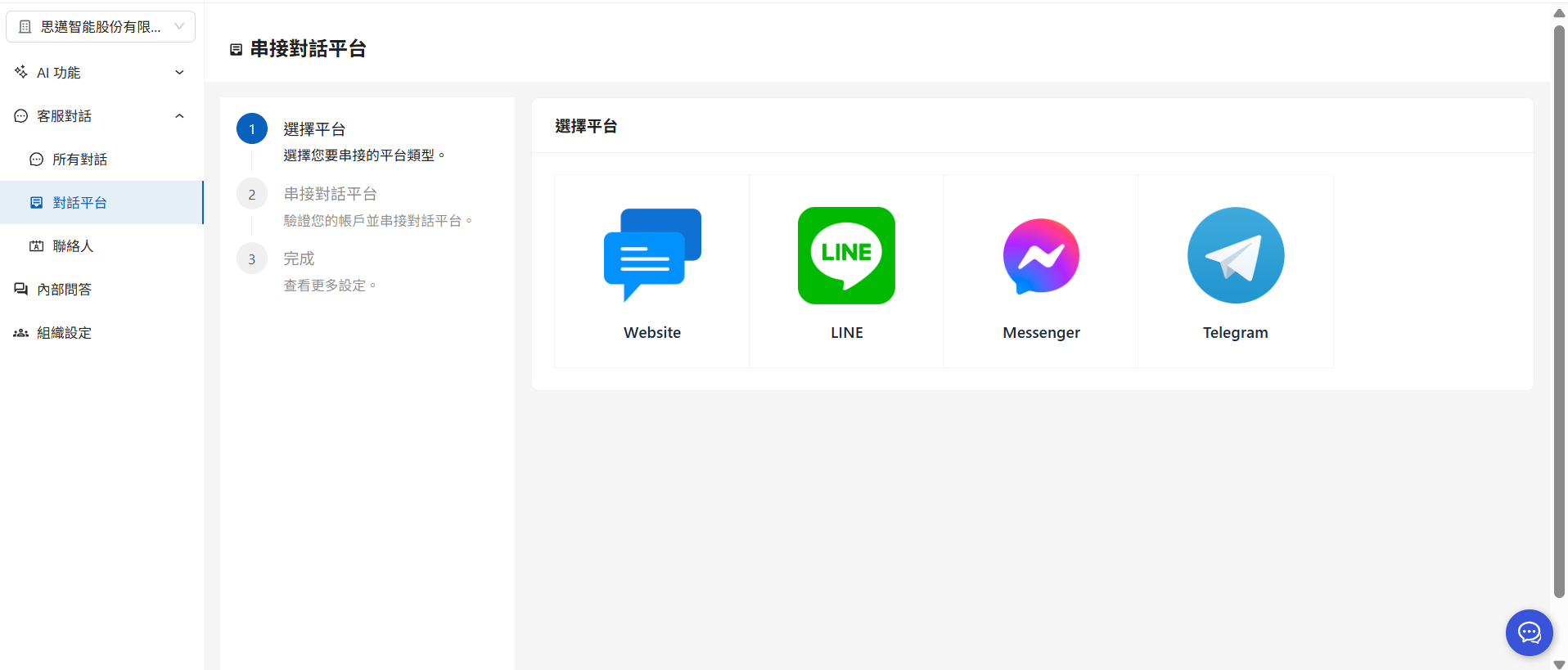
### 1. 到 MaiAgent 的對話平台頁面,點選「串接對話平台」
a. 點選右上角串接對話平台
b. 選擇 Messenger
c. 登入該粉專的 Facebook 帳號。
### 2. 選擇商家,並選擇(認領)粉專。
確定授權,建立成功後即完成託管。
### 3. AI 助理設定
輸入對話平台名稱、 選擇 AI 助理及 Messenger 頻道(即為您剛剛認領的粉絲專頁)
### 4. 確認串接結果
接著您可以在 MaiAgent 的內部對話試著針對該對話平台送出一個測試訊息,AI 助理如可以正常回覆對話,表示串接已成功。
您也可以到該粉專開啟 AI 助理對話,送出測試訊息,機器人如可以正常回覆對話,表示串接已成功。
---
# Agent Instructions
This documentation is published with GitBook. GitBook is the documentation platform designed so that both humans and AI agents can read, navigate, and reason over technical content effectively. Learn more at gitbook.com.
## Querying This Documentation
If you need additional information that is not directly available in this page, you can query the documentation dynamically by asking a question.
Perform an HTTP GET request on the current page URL with the `ask` query parameter, and the optional `goal` query parameter:
```
GET https://docs.maiagent.ai/conversations/fb.md?ask=&goal=
```
`ask` is the immediate question: it should be specific, self-contained, and written in natural language.
`goal` is optional and describes the broader end goal you are ultimately trying to accomplish on behalf of the user. GitBook uses it to tailor the answer towards what is most useful for that goal.
The response will contain a direct answer to the question and relevant excerpts and sources from the documentation.
Use this mechanism when the answer is not explicitly present in the current page, you need clarification or additional context, or you want to retrieve related documentation sections.
%20(1)%20(1)%20(1)%20(1).png?alt=media&token=39d980fa-e25f-4f33-a562-3bd92cfc14d6)
%20(1)%20(1)%20(1)%20(1)%20(1)%20(1)%20(1)%20(1)%20(1).png?alt=media&token=73165a00-dfca-4e1b-aaf9-e8232cfc1355)
%20(1).png?alt=media&token=b74d95f5-058c-4543-9f6d-1a199466313b)
.png?alt=media&token=79b5d3df-f535-41a3-9d1b-4405925b1bd0)
%20(1)%20(1)%20(1).png?alt=media&token=87122f07-52cf-4f0c-8cea-8bf5b04aa3d3)
%20(1)%20(1).png?alt=media&token=477feb41-744b-41cb-b3b4-02a9c4654db3)
%20(1)%20(1)%20(1).png?alt=media&token=ed851429-40b8-462b-b806-c8ce472c2448)
%20(1).png?alt=media&token=59c3b2d7-8fe1-4aa6-aa91-7a2ba542cf14)
.png?alt=media&token=7bb429b8-f373-4960-8fda-471600c2fc0c)
%20(1).png?alt=media&token=e846076c-ab58-47c8-b6fb-f9e5907de3cb)
%20(1)%20(1).png?alt=media&token=8238d2a2-7196-4b6e-ab0e-a17fa05dc641)