> For the complete documentation index, see [llms.txt](https://docs.maiagent.ai/llms.txt). Markdown versions of documentation pages are available by appending `.md` to page URLs; this page is available as [Markdown](https://docs.maiagent.ai/build/tools/tool_description.md).
# 工具功能概覽
本篇將介紹何謂工具,工具如何協助 Agent 及 MaiAgent 支援的工具類型概覽
## 什麼是工具?
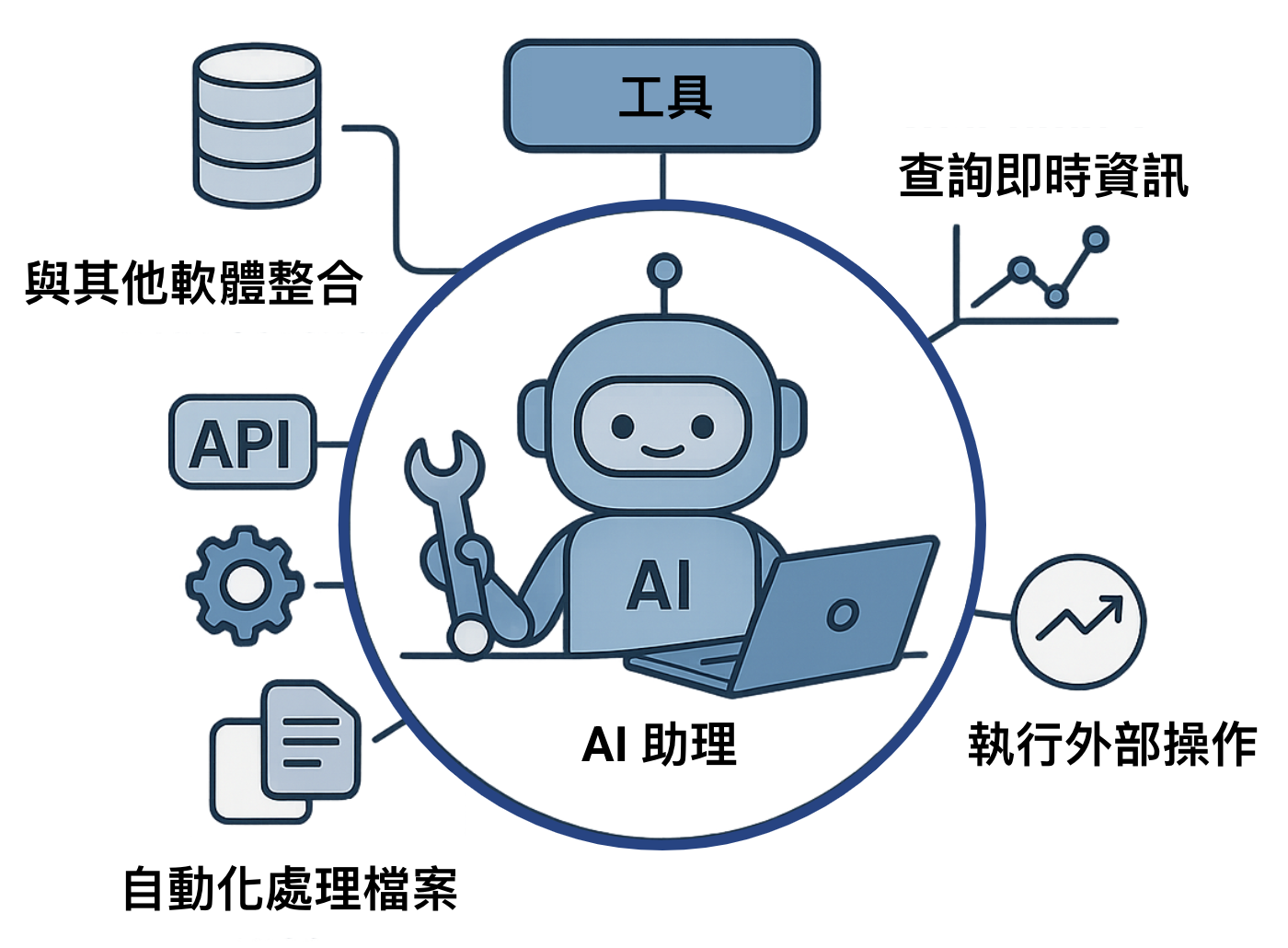
工具就像是 Agent 的**外掛**或**技能**,讓它不只能聊天,還能做更多事情。例如,如果 Agent 有「**查詢天氣」**這個工具,它就能告訴你今天的氣溫;如果它有「**播放音樂」**這個工具,就能直接幫你打開音樂。
透過讓用戶定義一組可供 Agent 使用的「工具」,Agent 能夠:
1. 理解使用者的複雜請求。
2. 自動地判斷何時需要使用特定的工具。
3. 自動生成呼叫該工具所需的參數。
這使得 Agent 不再僅限於生成文本回覆,更能實際執行多樣化的任務,例如:
* **查詢即時資訊:** 從資料庫或 API 獲取最新股價、天氣預報、航班狀態等。
* **執行外部操作:** 呼叫訂票系統 API、控制智慧家居設備、發送電子郵件或訊息。
* **處理檔案:** 讀取、寫入或分析本地或雲端文件。
* **與其他軟體整合:** 操作 CRM 系統、專案管理工具或其他企業應用程式。
## 工具的運作流程
您為 Agent 配置工具時,每個工具都帶有名稱、用途描述與參數說明。使用者提問後,Agent 依描述判斷要不要用、用哪個工具,產生呼叫所需的參數;平台實際執行工具(例如呼叫外部 API),再把結果交回 Agent 整理成回覆。因此工具描述寫得越清楚,Agent 越能在對的時機用對工具。完整的呼叫流程與原理,見技術手冊的 [Function Calling](https://docs.maiagent.ai/tech/advanced-genai-tech/function-calling)。
## 工具的主要優勢
工具讓 Agent 能存取即時資訊、執行實際操作,並透過結構化的呼叫與回傳降低回答錯誤的風險;使用者只要用自然語言描述需求即可。
## MaiAgent 支援工具類型
目前支援以下主要類型:
### 🌐 API 工具
* **最常用類型**。用於連接和呼叫外部的 HTTP/HTTPS API 服務。
* **常見應用**:獲取天氣資訊、查詢外部資料庫、觸發 webhook、與第三方服務整合等。
* **必要配置**:API 端點 URL、HTTP 方法、請求標頭 (Headers)、參數結構 (Parameters Schema),見 [建立 API 工具](/build/tools/setup_api_tool.md)。
### ☁️ MCP 工具
* **模型上下文協定**(Model Context Protocol, MCP),透過標準化協定實現伺服器、用戶端與主機的協作。
* **適用場景**:讓 Agent 調用外部工具執行更複雜和實用的任務。
* **必要配置**:MCP 伺服器網址、驗證方式(標頭或 OAuth 連接器)與允許 Agent 使用的工具,見 [建立 MCP 工具](/build/tools/mcp-setup.md)。
---
# Agent Instructions
This documentation is published with GitBook. GitBook is the documentation platform designed so that both humans and AI agents can read, navigate, and reason over technical content effectively. Learn more at gitbook.com.
## Querying This Documentation
If you need additional information that is not directly available in this page, you can query the documentation by asking a question.
Perform an HTTP GET request on the following URL with the `ask` and `goal` query parameters:
```
GET https://docs.maiagent.ai/build/tools/tool_description.md?ask=&goal=
```
`ask` is the immediate question: it should be specific, self-contained, and written in natural language.
`goal` is what the user is ultimately trying to achieve, the reason they need the answer. Sharing it helps GitBook give you a better, more relevant answer. A goal is most helpful when it describes the outcome the user wants rather than restating the question. For example, with `ask=how do I create an API token`, a goal like `automate deployments from our CI pipeline` lets GitBook tailor the answer to that use case.
The response will contain a direct answer to the question and relevant excerpts and sources from the documentation.
Use this mechanism when the answer is not explicitly present in the current page, you need clarification or additional context, or you want to retrieve related documentation sections.