> For the complete documentation index, see [llms.txt](https://docs.maiagent.ai/llms.txt). Markdown versions of documentation pages are available by appending `.md` to page URLs; this page is available as [Markdown](https://docs.maiagent.ai/build/skills.md).
# 技能
技能(Skill)是什麼、由哪些部分組成、Agent 如何展開技能執行多步驟流程,以及技能和工具的差異與適用情境。建立與管理方式見技能管理。
技能:定義多步驟 SOP,Agent 按流程引導對話
## 這是什麼?
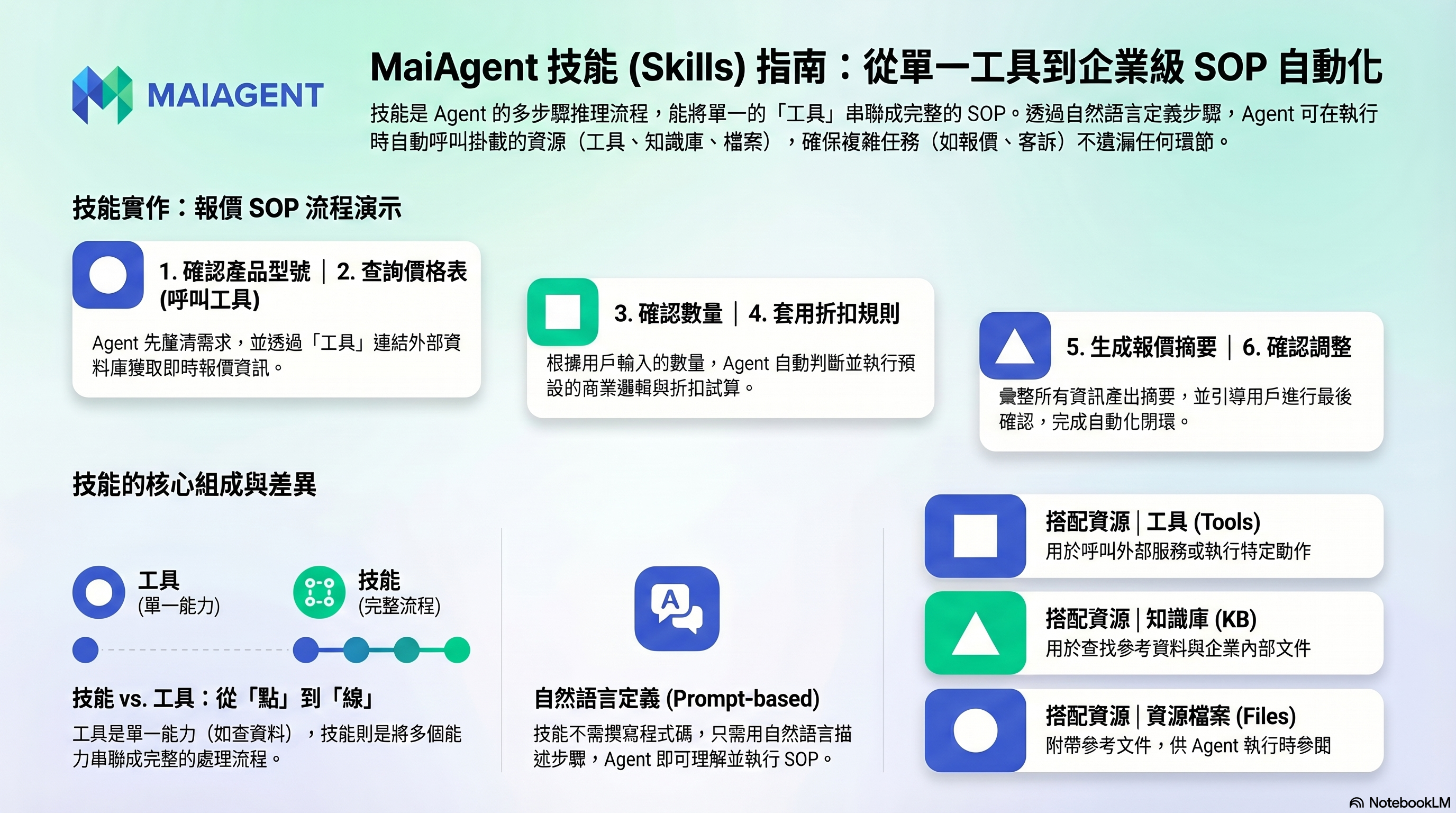
技能是 Agent 的多步驟處理流程。你用自然語言定義一套 SOP,Agent 在對話中遇到相關情境時,就會展開這套流程一步步處理。
如果工具是 Agent 的「單一能力」(像一把螺絲起子),技能就是「把多個能力串成一套完整的處理流程」(像一本組裝手冊):不只告訴 Agent 用什麼工具,也告訴它什麼時候用、怎麼用、用完之後要怎麼回覆。
## 用一個例子說明
假設你想讓 Agent 處理「客戶報價」:
**沒有技能**:Agent 可能東回一句西回一句,遺漏重要資訊。
**有技能**:你定義了一套報價 SOP——
```
1. 先確認客戶需要的產品型號
2. 查詢產品價格表(用工具)
3. 確認客戶的數量需求
4. 根據數量套用折扣規則
5. 生成報價單摘要
6. 詢問客戶是否需要調整
```
Agent 會按這個流程引導對話,確保每一步都不遺漏。
## 技能裡面可以用什麼?
每個技能由三個部分組成,三者手動建立或上傳建立的技能都可以設定:
| 組成 | 說明 |
| -------- | ---------------------------------------------------------------------------------------------------------------------------------------- |
| **指令內容** | Markdown 格式的 SOP,用自然語言寫出完整的處理步驟與回覆格式。指令中也可以要求 Agent 查詢它已掛載的知識庫 |
| **附加工具** | 技能流程中需要呼叫的工具(API 工具、MCP 工具),會隨技能一起提供給 Agent |
| **資源檔案** | 技能附帶的參考文件、範本或程式腳本。Agent 有開啟 [Code Interpreter](/build/agent/code-interpreter.md) 時,展開技能會把這些檔案放進程式執行環境,讓 Agent 讀取或處理;沒有開啟時,Agent 只會用到指令內容 |
{% hint style="info" %}
技能的定義是純文字的提示詞,不是流程圖或程式碼。你可以用自然語言描述整套流程,Agent 會理解並執行。
{% endhint %}
## 技能怎麼運作
1. **建立技能**:填寫名稱與描述,撰寫指令內容,需要時附加工具與資源檔案。描述要寫清楚用途和觸發時機,Agent 靠它判斷何時使用這個技能。
2. **綁定到 Agent**:在 Agent 的設定中選擇要使用的技能,一個 Agent 可以綁定多個技能。技能只在 回答模式 為 Agent 模式 的 Agent 生效。
3. **使用者提問**:例如「幫我查一下我的休假天數」。
4. **判斷並展開技能**:Agent 平時只看得到每個技能的名稱與描述;判斷問題該由某個技能處理時,才載入該技能的完整指令。因此綁定很多技能,也不會讓每次對話塞滿用不到的指令。
5. **執行並回覆**:Agent 依指令步驟呼叫附加工具(查詢資料庫、呼叫 API 等),再依指令定義的格式整理成回覆。
運作原理、`SKILL.md` 規格與 API 見技術手冊的 [Skill 技能模組](https://docs.maiagent.ai/tech/advanced-genai-tech/skill)。
## 技能的主要優勢
* **複雜任務標準化**:每次都照同一套 SOP 執行,回答品質一致。
* **精準觸發與分工**:不同技能負責不同任務,Agent 依描述判斷該用哪一個。
* **可重複使用與分享**:一個技能可以綁定到多個 Agent,也可以匯出成 `.skill` 檔分享給其他組織。
* **指令與工具封裝**:把「做什麼」和「用什麼」打包在一起,不必在角色指令裡重複寫大量流程細節。
## 技能和工具的差異
| 比較項目 | 工具 | 技能 |
| -------- | ---------------- | ----------------- |
| **本質** | 單一的外部能力(API、MCP) | 一套完整的執行流程 |
| **包含內容** | API 端點/MCP 伺服器 | 指令+工具+資源檔案 |
| **類比** | 螺絲起子 | 組裝手冊+螺絲起子 |
| **觸發方式** | Agent 自行判斷是否呼叫 | Agent 依技能描述判斷是否展開 |
| **適用場景** | 單一動作(查天氣、寄信) | 多步驟流程(退貨處理、休假計算) |
技能和工具是互補的:技能透過附加工具取得實際執行的能力,工具則需要技能的指令告訴 Agent 何時、依什麼順序使用。
## 什麼時候適合用技能?
* **有固定 SOP 的流程**:報價、客訴處理、問題診斷
* **需要多輪收集資訊**:預約流程(要問日期、時間、人數)
* **需要條件判斷**:根據不同情況走不同處理路徑
* **需要確保不遺漏步驟**:表單填寫引導、審核流程
## 什麼時候不需要技能?
* 簡單的一問一答(知識庫就夠了)
* 只需要查一個資料或做一個動作(用工具就好)
## 應用場景範例
| 情境 | 技能 | 觸發時機 | 步驟 | 附加工具 |
| ---- | ------ | ------------- | ------------------------------ | ----------------------- |
| 企業客服 | 退貨處理流程 | 客戶要求退貨、換貨 | 查詢訂單 → 確認退貨資格 → 建立退貨單 → 回覆處理結果 | 訂單查詢 API、退貨系統 API |
| 政府機關 | 休假天數計算 | 詢問休假天數、特休天數 | 確認人員類別 → 檢索法規範例 → 比對計算 → 產出結果 | 知識庫檢索 |
| 電商平台 | 客戶資料收集 | 客戶表達採購意願、索取報價 | 引導提供姓名、公司、聯絡方式 → 寫入 CRM | Google Sheet API、CRM 工具 |
| 行銷團隊 | 郵件發送服務 | 要求寄送郵件、聯繫客戶 | 確認收件人 → 撰寫郵件內容 → 發送 | Gmail MCP 工具 |
## 我需要做什麼?
1. **建立技能**:手動撰寫,或上傳 `.skill`/`.zip` 技能包,見 [技能管理:建立技能](/build/skills/skills-management.md#create-skill)
2. **描述流程**:在指令內容用自然語言寫出完整的處理步驟
3. **附加工具與檔案**:需要時在 附加工具、檔案 頁籤補上,見 [編輯與設定技能](/build/skills/skills-management.md#edit-and-configure-skill)
4. **綁定到 Agent**:在 Agent 設定中啟用此技能,見 [將技能綁定至 Agent](/build/skills/skills-management.md#bind-skill-to-ai-agent)
5. **測試**:模擬使用者對話,確認流程是否順暢
---
# Agent Instructions
This documentation is published with GitBook. GitBook is the documentation platform designed so that both humans and AI agents can read, navigate, and reason over technical content effectively. Learn more at gitbook.com.
## Querying This Documentation
If you need additional information that is not directly available in this page, you can query the documentation by asking a question.
Perform an HTTP GET request on the following URL with the `ask` and `goal` query parameters:
```
GET https://docs.maiagent.ai/build/skills.md?ask=&goal=
```
`ask` is the immediate question: it should be specific, self-contained, and written in natural language.
`goal` is what the user is ultimately trying to achieve, the reason they need the answer. Sharing it helps GitBook give you a better, more relevant answer. A goal is most helpful when it describes the outcome the user wants rather than restating the question. For example, with `ask=how do I create an API token`, a goal like `automate deployments from our CI pipeline` lets GitBook tailor the answer to that use case.
The response will contain a direct answer to the question and relevant excerpts and sources from the documentation.
Use this mechanism when the answer is not explicitly present in the current page, you need clarification or additional context, or you want to retrieve related documentation sections.