> For the complete documentation index, see [llms.txt](https://docs.maiagent.ai/llms.txt). Markdown versions of documentation pages are available by appending `.md` to page URLs; this page is available as [Markdown](https://docs.maiagent.ai/build/knowledge-base/crawler.md).

# 爬蟲

爬蟲是什麼：給一個網址自動抓取網頁內容並匯入知識庫，什麼時候需要用、與知識庫的關係，以及設定前要準備什麼。

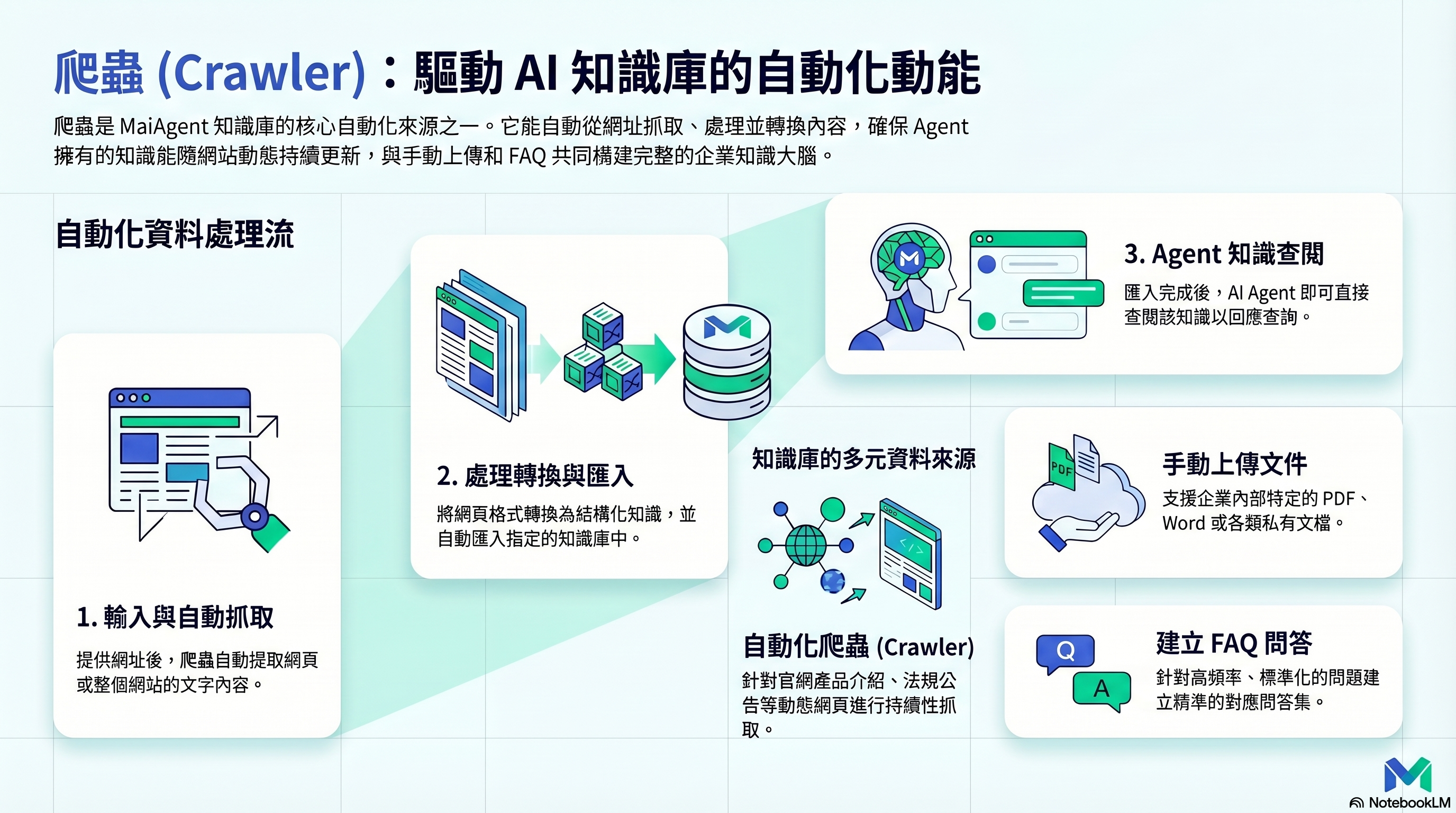
<figure><img src="https://1593648278-files.gitbook.io/~/files/v0/b/gitbook-x-prod.appspot.com/o/spaces%2Fmzb5NG9GDzFP2YDKeYVl%2Fuploads%2Fgit-blob-61507b5c380bef646f2b6892dc510feddab0993d%2Fcrawler-infographic.png?alt=media" alt="爬蟲概念"><figcaption><p>爬蟲：自動抓取網頁內容，匯入知識庫</p></figcaption></figure>

## 這是什麼？ <a href="#what-is-this" id="what-is-this"></a>

爬蟲能自動從網頁抓取內容，並匯入到知識庫中。你只要給它一個網址，它就能爬取該頁面（或整個網站）的文字內容，轉換成 Agent 能查閱的知識。

## 什麼時候需要用？ <a href="#when-do-you-need-it" id="when-do-you-need-it"></a>

* **官網內容**：把公司官網的產品介紹、服務說明自動匯入
* **公開資訊**：抓取法規、公告、技術文件等公開網頁
* **持續更新**：網站內容會變動，定期重新爬取保持知識庫最新

## 爬蟲和知識庫的關係 <a href="#crawler-and-knowledge-base-relationship" id="crawler-and-knowledge-base-relationship"></a>

爬蟲是知識庫的**資料來源之一**。它的定位是：

```
資料來源           知識庫            Agent
─────────        ──────           ──────
手動上傳文件 ──→
建立 FAQ    ──→  企業知識百科  ──→  查閱並回覆
爬蟲抓網頁  ──→
```

爬蟲抓到的內容最終會進入知識庫，Agent 不會直接跟爬蟲互動。

## 我需要做什麼？ <a href="#what-do-i-need-to-do" id="what-do-i-need-to-do"></a>

1. **輸入網址** — 告訴爬蟲要抓哪個網頁或網站
2. **設定範圍** — 用最大爬取深度、最大爬取頁數與網址規則決定只抓起始頁，還是連同站內的子頁面一起抓（規則見[爬取範圍怎麼決定](/build/knowledge-base/scrape-website.md#crawl-scope-rules)）；多語網站另可指定[爬取語系／地區](#crawl-locale)
3. **執行爬取** — 啟動爬蟲，等待完成
4. **匯入知識庫** — 將爬取結果匯入指定的知識庫
5. **驗證內容** — 檢查匯入的內容是否正確完整

## 多語網站：指定爬取語系／地區 <a href="#crawl-locale" id="crawl-locale"></a>

有些網站同時提供中文、英文等多個語言版本，會依瀏覽器的語言決定回傳哪一版。爬蟲沒有指定語言時，網站可能把它當成英文訪客，轉到英文版頁面，結果知識庫收到的是英文內容；只爬單一頁面時，起始頁還可能被轉到起始網址以外的路徑，最後一頁都沒爬到。

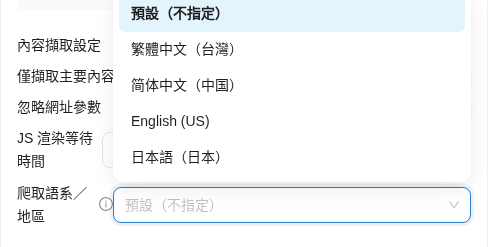
這時可以在建立爬取請求的「爬取設定」步驟，展開 <mark style="color:blue;">進階設定</mark>，在 <mark style="color:blue;">內容擷取設定</mark> 下方的 <mark style="color:blue;">爬取語系／地區</mark> 選擇要用哪個語言與地區讀取網站：

| 選項                                            | 說明                                |
| --------------------------------------------- | --------------------------------- |
| <mark style="color:blue;">預設（不指定）</mark>      | 新建請求的預設值。不向網站宣告語言，由爬取服務決定（目前等同英文） |
| <mark style="color:blue;">繁體中文（台灣）</mark>     | 以繁體中文、台灣地區讀取網站                    |
| <mark style="color:blue;">简体中文（中国）</mark>     | 以簡體中文、中國地區讀取網站                    |
| <mark style="color:blue;">English (US)</mark> | 固定以英文讀取，不受爬取服務日後預設改變影響            |
| <mark style="color:blue;">日本語（日本）</mark>      | 以日文、日本地區讀取網站                      |

<figure><img src="https://1593648278-files.gitbook.io/~/files/v0/b/gitbook-x-prod.appspot.com/o/spaces%2Fmzb5NG9GDzFP2YDKeYVl%2Fuploads%2Fgit-blob-b4a6c630ca887baf06158b0c3d3cbec5be212160%2Fcrawl-create-locale-options.png?alt=media" alt="內容擷取設定下方的爬取語系／地區下拉選單展開，選項有預設（不指定）、繁體中文（台灣）、简体中文（中国）、English (US)、日本語（日本）"><figcaption><p>爬取語系／地區：在內容擷取設定下方選擇讀取網站的語言與地區</p></figcaption></figure>

選定的語系會套用到這個爬取任務的每一步：

* **預覽**：在「執行方式」步驟按 <mark style="color:blue;">預覽</mark> 時，也用同一個語系探索網址，預覽列出的網址與實際爬取時一致
* **排程**：選 <mark style="color:blue;">排程執行</mark> 時，語系存在排程設定裡，之後每次排程執行都用同一個語系爬取。到「排程」分頁 <mark style="color:blue;">編輯</mark> 排程可以改語系，從下一次執行起改用新語系
* **詳情**：在爬取請求詳情展開 <mark style="color:blue;">爬取任務設定</mark>，可以看到這次使用的 <mark style="color:blue;">爬取語系／地區</mark>

例如，某家電品牌的知識庫管理員要把中英雙語官網 `https://www.example-appliance.com/` 的產品說明爬進知識庫，但先前爬回來的都是英文頁面。她重新建立爬取請求，在進階設定把 <mark style="color:blue;">爬取語系／地區</mark> 改成 <mark style="color:blue;">繁體中文（台灣）</mark>，到「執行方式」步驟按 <mark style="color:blue;">預覽</mark> 確認將爬取的都是中文頁面後再建立。爬取完成後，她在爬取請求詳情的 <mark style="color:blue;">爬取任務設定</mark> 看到語系是「繁體中文（台灣）」，已爬取頁面也都是中文標題；之後改用每週排程同步時，她在建立排程時選同一個語系，每次排程執行都會沿用。

{% hint style="info" %}
爬蟲不會翻譯內容。網站本身沒有所選語言的版本時，收錄的是網站實際回應的內容。語系設定只屬於該爬取任務或排程，不影響組織內其他爬取任務；沒有設定語系的既有任務與排程行為不變。
{% endhint %}

完整欄位與操作步驟見[如何使用爬蟲（爬取資料）功能](/build/knowledge-base/scrape-website.md#step-crawl-settings)。

## 延伸閱讀 <a href="#further-reading" id="further-reading"></a>

* [如何使用爬蟲（爬取資料）功能](/build/knowledge-base/scrape-website.md)


---

# Agent Instructions
This documentation is published with GitBook. GitBook is the documentation platform designed so that both humans and AI agents can read, navigate, and reason over technical content effectively. Learn more at gitbook.com.

## Querying This Documentation
If you need additional information that is not directly available in this page, you can query the documentation by asking a question.

Perform an HTTP GET request on the following URL with the `ask` and `goal` query parameters:

```
GET https://docs.maiagent.ai/build/knowledge-base/crawler.md?ask=<question>&goal=<user_goal>
```

`ask` is the immediate question: it should be specific, self-contained, and written in natural language.
`goal` is what the user is ultimately trying to achieve, the reason they need the answer. Sharing it helps GitBook give you a better, more relevant answer. A goal is most helpful when it describes the outcome the user wants rather than restating the question. For example, with `ask=how do I create an API token`, a goal like `automate deployments from our CI pipeline` lets GitBook tailor the answer to that use case.

The response will contain a direct answer to the question and relevant excerpts and sources from the documentation.

Use this mechanism when the answer is not explicitly present in the current page, you need clarification or additional context, or you want to retrieve related documentation sections.