> For the complete documentation index, see [llms.txt](https://docs.maiagent.ai/llms.txt). Markdown versions of documentation pages are available by appending `.md` to page URLs; this page is available as [Markdown](https://docs.maiagent.ai/build/database.md).
# 資料庫
資料庫(Text to SQL)是什麼:讓 Agent 用自然語言查詢結構化數據,支援的資料庫類型、與知識庫的差異、安全性與建立步驟。
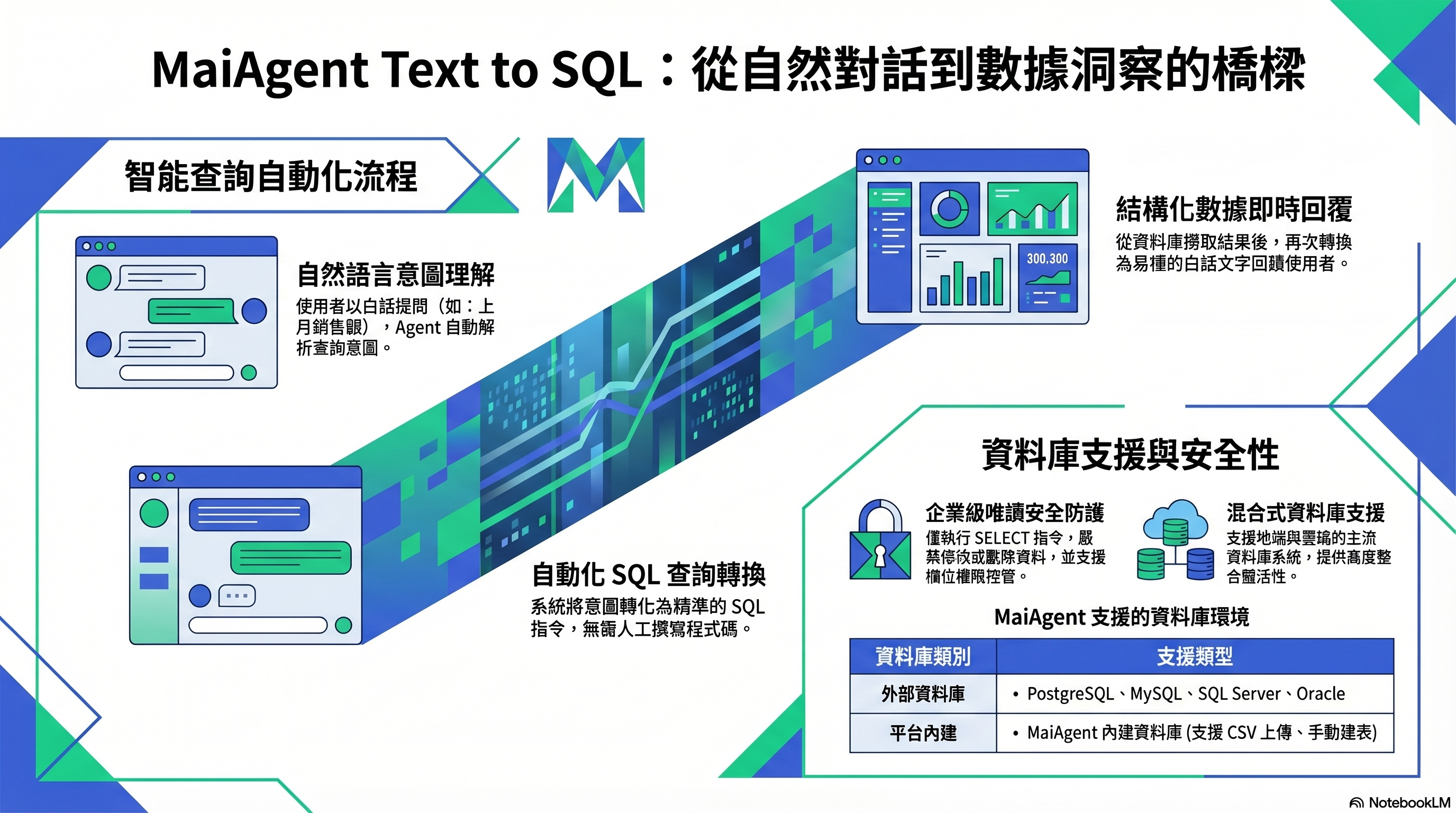
Text to SQL:自然語言 → SQL 查詢 → 白話回覆
## 這是什麼?
資料庫讓 Agent 能用自然語言查詢結構化數據。使用者問「上個月我們賣了多少台筆電?」,Agent 會自動把這句話轉成 SQL 查詢,從資料庫撈出答案再用白話回覆。
這個功能的技術名稱是 **Text to SQL**。
## 什麼時候需要用?
當你的場景涉及:
* **數據查詢**:訂單狀態、庫存數量、銷售額
* **統計分析**:「本季業績比上季成長多少?」
* **即時狀態**:「目前有幾筆待處理的工單?」
這些問題的答案存在結構化的表格裡,不是在文件中,所以需要資料庫而非知識庫。
## 支援什麼資料庫?
| 類型 | 說明 |
| ------------------ | ----------------------------------------------- |
| **MaiAgent 內建資料庫** | 平台自帶的資料庫,上傳 Excel、CSV 或 JSON 檔案即自動建立資料表 |
| **外部資料庫** | 連線到你的 PostgreSQL、MySQL、SQL Server、Oracle、SynxDB |
## 安全嗎?
Agent 只會執行**唯讀查詢**(SELECT),不會修改或刪除你的資料。外部資料庫可以用 指定資料表 限制 Agent 查詢的資料表;真正讀得到哪些資料表與欄位,由你提供的資料庫帳號權限決定,建議使用唯讀帳號,敏感欄位可改用只含必要欄位的檢視表(View)。
> **進階說明**:Text to SQL 的準確度取決於表格結構的清晰度。建議為表格和欄位加上中文描述,幫助 Agent 理解每個欄位代表什麼含義。
## 我需要做什麼?
1. **建立資料庫** — 上傳試算表建立 MaiAgent 資料庫,或填寫外部資料庫的連線字串,再開啟 啟用資料庫
2. **設定可查詢的資料表** — 外部資料庫可用 指定資料表 縮小範圍
3. **加欄位描述** — 為資料表與欄位加上說明,提升查詢準確度
4. **關聯到 Agent** — Agent 須使用 Agent 模式,在 資料庫設定 選擇資料庫
5. **測試查詢** — 在對話中用自然語言提問,確認 Agent 能正確查詢
## 延伸閱讀
* [Text to SQL 功能](/build/database/text2sql.md)
* [建立與設定資料庫](/build/database/create-database.md)
* [MaiAgent 資料庫進行 Text to SQL](/build/database/text-to-sql-maiagent.md)
* [使用 Supabase 進行 Text to SQL](/build/database/text-to-sql-supabase.md)
---
# Agent Instructions
This documentation is published with GitBook. GitBook is the documentation platform designed so that both humans and AI agents can read, navigate, and reason over technical content effectively. Learn more at gitbook.com.
## Querying This Documentation
If you need additional information that is not directly available in this page, you can query the documentation by asking a question.
Perform an HTTP GET request on the following URL with the `ask` and `goal` query parameters:
```
GET https://docs.maiagent.ai/build/database.md?ask=&goal=
```
`ask` is the immediate question: it should be specific, self-contained, and written in natural language.
`goal` is what the user is ultimately trying to achieve, the reason they need the answer. Sharing it helps GitBook give you a better, more relevant answer. A goal is most helpful when it describes the outcome the user wants rather than restating the question. For example, with `ask=how do I create an API token`, a goal like `automate deployments from our CI pipeline` lets GitBook tailor the answer to that use case.
The response will contain a direct answer to the question and relevant excerpts and sources from the documentation.
Use this mechanism when the answer is not explicitly present in the current page, you need clarification or additional context, or you want to retrieve related documentation sections.