> For the complete documentation index, see [llms.txt](https://docs.maiagent.ai/llms.txt). Markdown versions of documentation pages are available by appending `.md` to page URLs; this page is available as [Markdown](https://docs.maiagent.ai/build/cross-conversation-search.md).
# 跨對話檢索
讓 AI 助理在同一位聯絡人的近期對話中搜尋相關內容
跨對話檢索讓 AI 助理在回覆時,搜尋同一位聯絡人在同一個收件匣中的近期對話。適合需要延續服務紀錄,但使用者可能經常開啟新對話的情境。
{% hint style="info" %}
此功能預設關閉。開啟後只會放寬 AI 助理的搜尋範圍,不會把不同聯絡人或不同收件匣的內容混在一起。
{% endhint %}
## 開啟跨對話檢索
{% stepper %}
{% step %}
在左側選單點選「AI 助理」。
{% endstep %}
{% step %}
選擇要設定的 AI 助理,進入「設定」。
{% endstep %}
{% step %}
開啟「進階設定」。
{% endstep %}
{% step %}
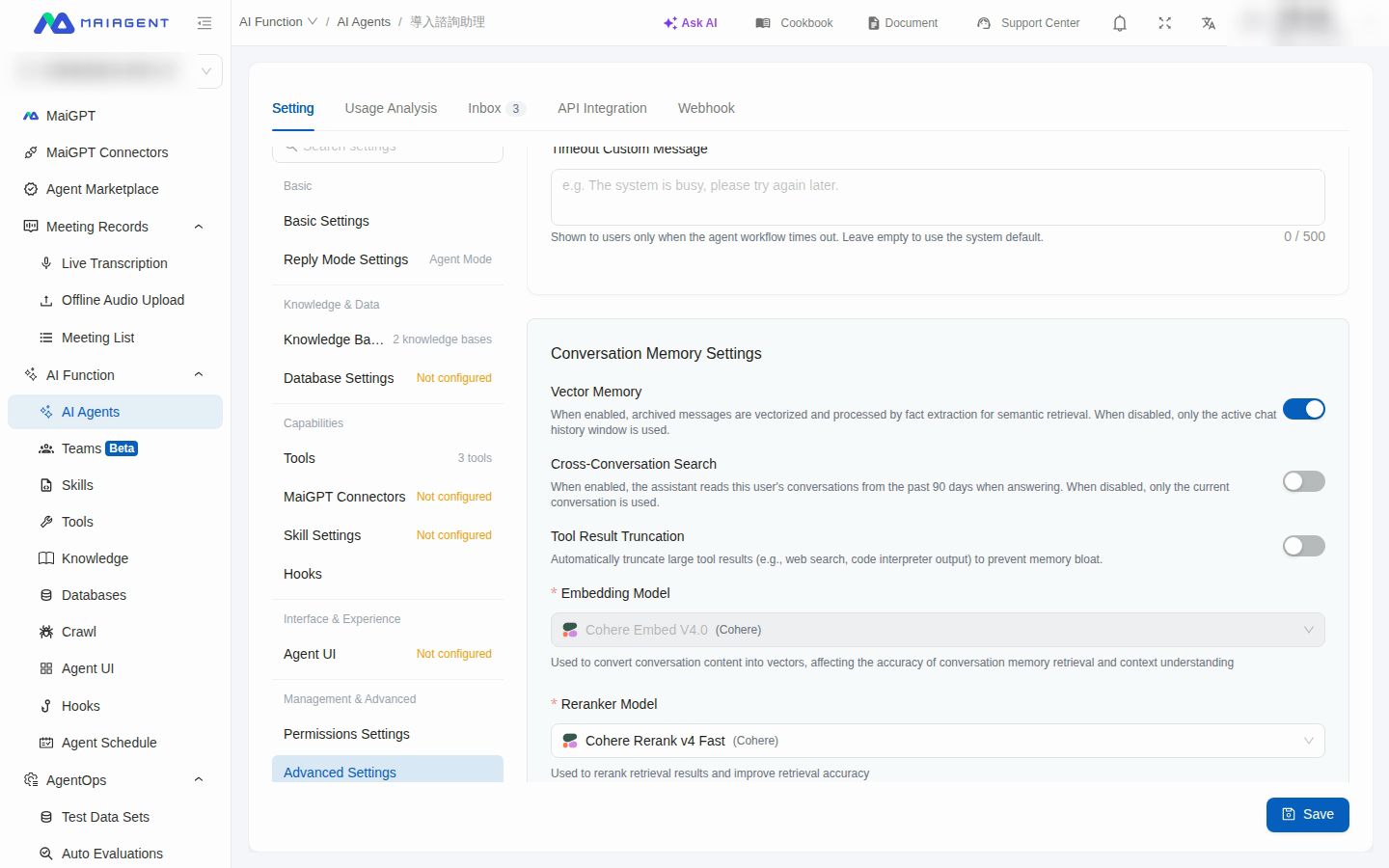
在對話記憶設定中開啟「跨對話檢索」。
{% endstep %}
{% step %}
在「可回溯天數」輸入 1 至 365 天。預設為 90 天。
在進階設定中開啟跨對話檢索,並設定近期對話的搜尋範圍
{% endstep %}
{% step %}
點選「儲存」。
{% endstep %}
{% endstepper %}
{% hint style="warning" %}
回溯天數越長,可搜尋的歷史範圍越大。請依服務需求設定,並遵循組織的資料使用與隱私規範。
{% endhint %}
## 使用情境
小麥科技的客服助理負責追蹤售後案件。顧客在上週的對話中提供訂單狀況,今天另開新對話詢問進度。管理者為客服助理開啟跨對話檢索,並把可回溯天數設為 30 天;儲存後,助理便可透過對話歷史工具找到同一位顧客近期對話中的相關內容,再依找到的紀錄回覆。
## 功能範圍
跨對話檢索的範圍包括:
* 同一位聯絡人
* 同一個收件匣
* 未刪除的一般聊天對話
* 最後一則訊息落在設定天數內的對話
符合回溯範圍的對話會納入整段訊息,而不只納入回溯期間內的訊息。系統最多選取最近有活動的 200 段對話;目前這一段對話則不受回溯天數限制,永遠會納入搜尋範圍。
關閉功能後,助理只會搜尋目前這一段對話。跨對話檢索與「向量記憶」是兩個獨立設定,可以分別開啟或關閉。
---
# Agent Instructions
This documentation is published with GitBook. GitBook is the documentation platform designed so that both humans and AI agents can read, navigate, and reason over technical content effectively. Learn more at gitbook.com.
## Querying This Documentation
If you need additional information that is not directly available in this page, you can query the documentation dynamically by asking a question.
Perform an HTTP GET request on the current page URL with the `ask` query parameter, and the optional `goal` query parameter:
```
GET https://docs.maiagent.ai/build/cross-conversation-search.md?ask=&goal=
```
`ask` is the immediate question: it should be specific, self-contained, and written in natural language.
`goal` is optional and describes the broader end goal you are ultimately trying to accomplish on behalf of the user. GitBook uses it to tailor the answer towards what is most useful for that goal.
The response will contain a direct answer to the question and relevant excerpts and sources from the documentation.
Use this mechanism when the answer is not explicitly present in the current page, you need clarification or additional context, or you want to retrieve related documentation sections.