> For the complete documentation index, see [llms.txt](https://docs.maiagent.ai/llms.txt). Markdown versions of documentation pages are available by appending `.md` to page URLs; this page is available as [Markdown](https://docs.maiagent.ai/build/agent/explain.md).

# Agent 的功能

Agent 的功能與用途：常見企業應用範例，以及 MaiAgent 建置 Agent 的四個階段（建立、知識庫、工具、對話平台）。

## Agent 建置目的與用途 <a href="#ai-agent-purpose-and-use" id="ai-agent-purpose-and-use"></a>

Agent 可廣泛應用於多元產業與使用情境，協助企業自動化重複性任務、提升營運效率，讓團隊能專注投入於高價值工作與核心優勢的發展。

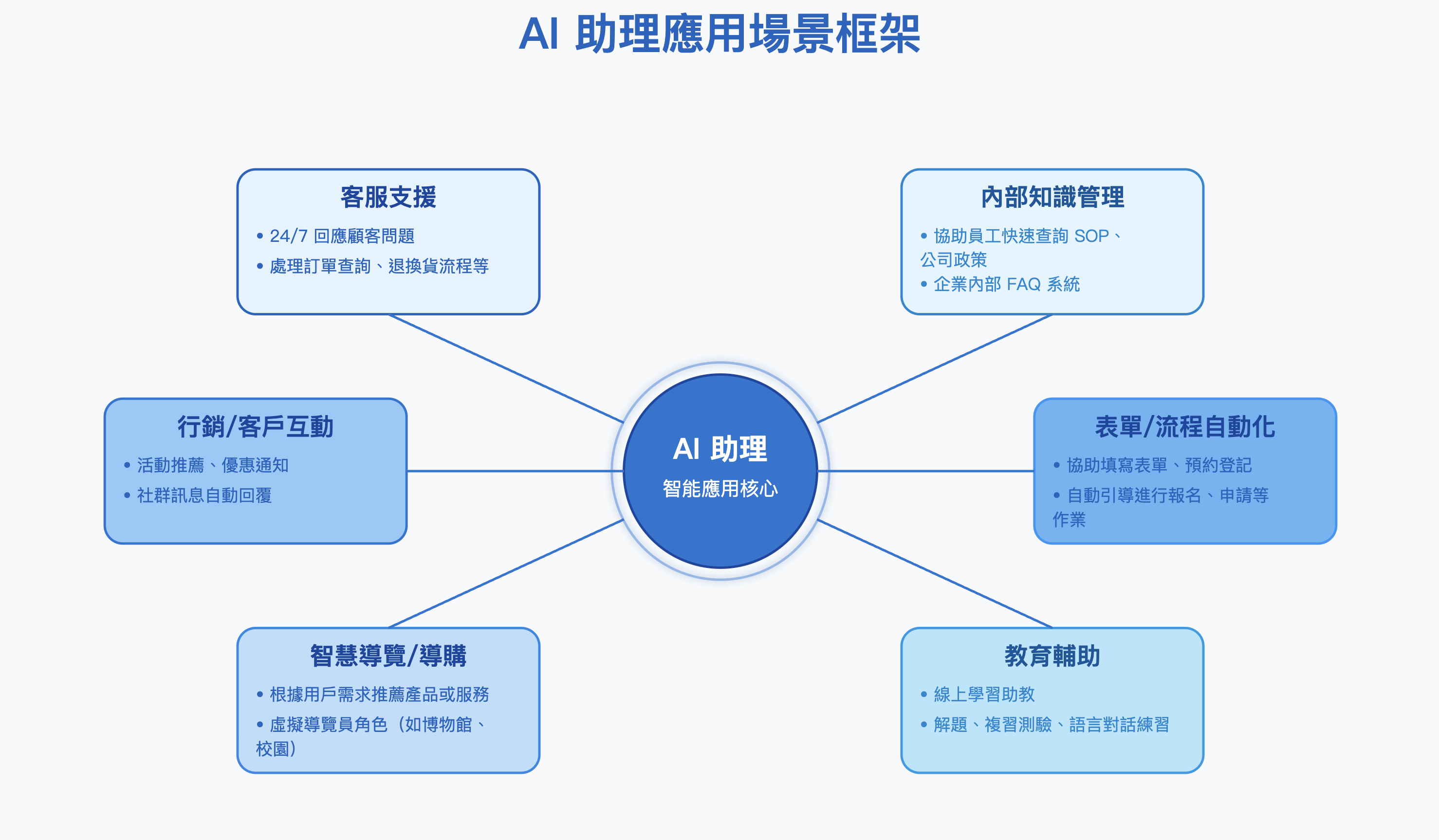
以下為常見企業工作流程中，Agent 的應用範例：

<figure><img src="https://1593648278-files.gitbook.io/~/files/v0/b/gitbook-x-prod.appspot.com/o/spaces%2Fmzb5NG9GDzFP2YDKeYVl%2Fuploads%2Fgit-blob-bf43aacb68fe112214ee71f970e0a230ef416879%2F%E6%88%AA%E5%9C%96%202025-04-22%20%E4%B8%8B%E5%8D%882.46.51.png?alt=media" alt=""><figcaption></figcaption></figure>

Agent 可應用於多元產業，發揮智慧自動化與即時互動的優勢，協助企業優化流程、提升服務品質與用戶體驗。下方列出各產業常見的 Agent 應用情境供參考。

<table><thead><tr><th width="214.15234375">產業</th><th>應用場景</th></tr></thead><tbody><tr><td>電商零售</td><td>智慧客服、導購推薦、退貨流程處理</td></tr><tr><td>金融保險</td><td>保單諮詢、理財推薦、風險問答</td></tr><tr><td>教育</td><td>課程助教、學習診斷、語言練習</td></tr><tr><td>醫療</td><td>健康諮詢、預約掛號、病患教育輔助</td></tr><tr><td>政府機關</td><td>公共服務查詢、政策問答、民意回饋</td></tr><tr><td>製造業</td><td>內部知識管理、維修操作指引</td></tr><tr><td>旅遊觀光</td><td>行程推薦、導覽、即時問答支援</td></tr></tbody></table>

## MaiAgent 的 Agent 設定四階段 <a href="#maiagent-ai-agent-setup-four-stages" id="maiagent-ai-agent-setup-four-stages"></a>

MaiAgent 的 Agent 的設定流程可分為四大階段，下方簡要說明各階段的目標與功能，完整的操作步驟將在接下來的章節中為您詳細介紹。

### 1. 建立新的 Agent <a href="#create-new-ai-agent" id="create-new-ai-agent"></a>

可依需求客製化 Agent，選擇合適的語言模型、在<mark style="color:blue;">知識庫設定</mark>連結 RAG（檢索增強生成）所需的知識庫，並定義 Agent 的角色與任務定位，打造符合企業場景的智能助理。

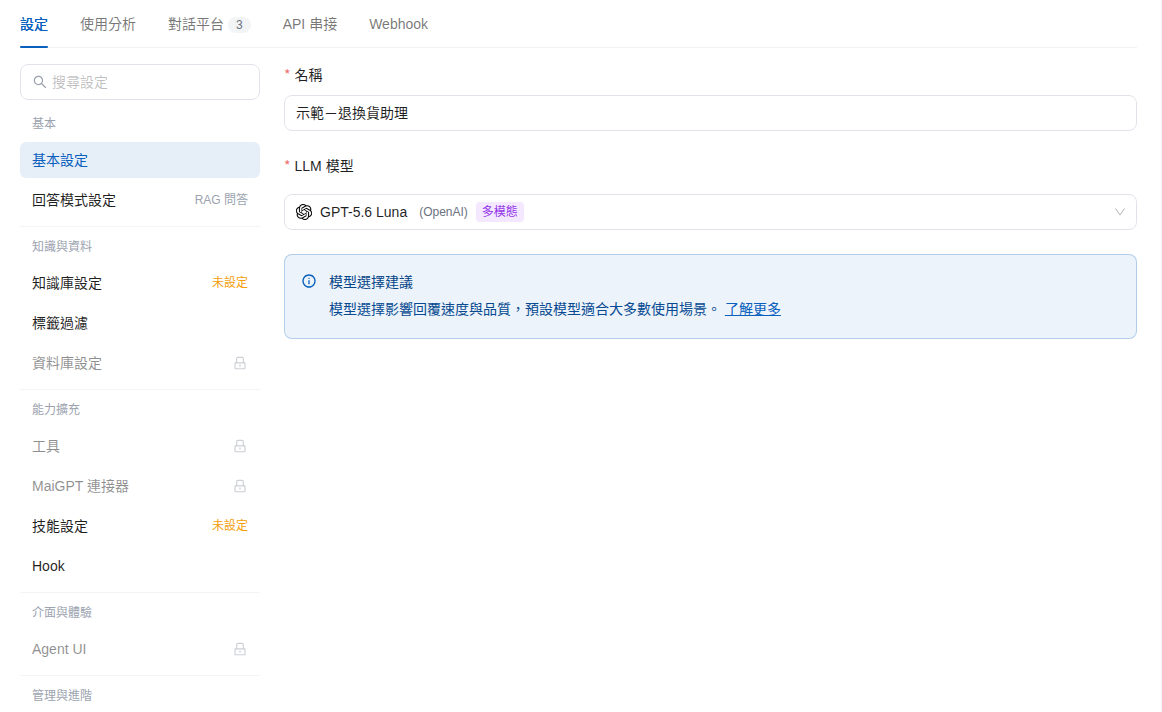
進入 Agent 的<mark style="color:blue;">設定</mark>頁後，左側依<mark style="color:blue;">基本</mark>、<mark style="color:blue;">知識與資料</mark>、<mark style="color:blue;">能力擴充</mark>、<mark style="color:blue;">介面與體驗</mark>、<mark style="color:blue;">管理與進階</mark>分組列出各項設定，例如<mark style="color:blue;">基本設定</mark>、<mark style="color:blue;">回答模式設定</mark>、<mark style="color:blue;">知識庫設定</mark>與<mark style="color:blue;">權限設定</mark>。

<figure><img src="https://1593648278-files.gitbook.io/~/files/v0/b/gitbook-x-prod.appspot.com/o/spaces%2Fmzb5NG9GDzFP2YDKeYVl%2Fuploads%2Fgit-blob-ea27e7a463185fe624aec017f06797d609848339%2Fai-agent-settings-nav.png?alt=media" alt="Agent 設定頁，上方為設定、使用分析、對話平台、API 串接、Webhook 分頁，左側為分組的設定項目"><figcaption><p>Agent 設定頁與左側設定分組</p></figcaption></figure>

### 2. 提供 Agent 參考資料 <a href="#provide-ai-agent-reference-materials" id="provide-ai-agent-reference-materials"></a>

透過設定<mark style="color:blue;">知識庫</mark>、在知識庫中建立 <mark style="color:blue;">FAQ 常見問題</mark>，或使用<mark style="color:blue;">爬蟲</mark>匯入網頁等資料來源，為 Agent 建立完善的知識基礎，進一步提升回覆的準確性與實用性。

### 3. 讓 Agent 正式上線 <a href="#launch-ai-agent" id="launch-ai-agent"></a>

可依需求決定將 Agent 對外公開上線，或僅限於內部使用。在 Agent 的<mark style="color:blue;">對話平台</mark>分頁中，內建<mark style="color:blue;">網頁 Widget</mark>（對外，可取得嵌入代碼嵌入公司網站）、<mark style="color:blue;">內部對話</mark>（對內）與 <mark style="color:blue;">API</mark> 三種入口；若要透過 LINE 或 Messenger 等渠道服務客戶，可點選<mark style="color:blue;">連接渠道</mark>進行串接，靈活整合至既有平台。

<figure><img src="https://1593648278-files.gitbook.io/~/files/v0/b/gitbook-x-prod.appspot.com/o/spaces%2Fmzb5NG9GDzFP2YDKeYVl%2Fuploads%2Fgit-blob-3fb5cd9ff7ebdb63393f641081d57eb020ec18ca%2Fai-agent-platforms-tab.png?alt=media" alt="Agent 的對話平台分頁，列出網頁 Widget、內部對話、API 三個內建通道與連接渠道按鈕"><figcaption><p>對話平台分頁的內建通道與連接渠道</p></figcaption></figure>

### 4. 追蹤 Agent 運作成效 <a href="#track-ai-agent-performance" id="track-ai-agent-performance"></a>

運用<mark style="color:blue;">所有對話</mark>、Agent 的<mark style="color:blue;">使用分析</mark>（含回答品質分數等監控指標）與 <mark style="color:blue;">Webhook</mark> 功能進行效能追蹤，做為 Agent 持續優化與提升體驗的依據。

在建立 Agent 開始前，不妨先閱讀幾個有用的文章喔！

{% hint style="info" %}
🗣️[如何選擇 LLM 大型語言模型？](https://docs.maiagent.ai/tech/quickstart/llm)
{% endhint %}

{% hint style="info" %}
🔎[甚麼是RAG（Retrieval-Augmented Generation，檢索增強生成）？](https://docs.maiagent.ai/tech/quickstart/rag)
{% endhint %}

{% hint style="info" %}
👨‍👩‍👧‍👦[甚麼是 角色指令？](/build/agent/system-prompt.md)
{% endhint %}


---

# Agent Instructions
This documentation is published with GitBook. GitBook is the documentation platform designed so that both humans and AI agents can read, navigate, and reason over technical content effectively. Learn more at gitbook.com.

## Querying This Documentation
If you need additional information that is not directly available in this page, you can query the documentation by asking a question.

Perform an HTTP GET request on the following URL with the `ask` and `goal` query parameters:

```
GET https://docs.maiagent.ai/build/agent/explain.md?ask=<question>&goal=<user_goal>
```

`ask` is the immediate question: it should be specific, self-contained, and written in natural language.
`goal` is what the user is ultimately trying to achieve, the reason they need the answer. Sharing it helps GitBook give you a better, more relevant answer. A goal is most helpful when it describes the outcome the user wants rather than restating the question. For example, with `ask=how do I create an API token`, a goal like `automate deployments from our CI pipeline` lets GitBook tailor the answer to that use case.

The response will contain a direct answer to the question and relevant excerpts and sources from the documentation.

Use this mechanism when the answer is not explicitly present in the current page, you need clarification or additional context, or you want to retrieve related documentation sections.